Construction Project Management App India: Plan, Track Progress Against The BOQ, And Watch Cost On Every Project
Trackovo is a construction project management app for Indian builders, contractors and interior firms. Import the BOQ, plan the work, log progress with photos, keep material, labour and payments on the same project, and keep the client informed, on Android, iPhone and the web.
No card needed · Android, iPhone and web · Labour log in free
In short: A construction project management app keeps the whole project on one record: the BOQ, the plan and Gantt timeline, daily progress with photos, delays with reasons, material, labour and payments, variations and client updates. Trackovo does this for Indian builders, contractors and interior firms on Android, iPhone and the web, with an Excel BOQ import, every module in every plan and free labour logins, from Rs 1,799 a month plus GST with a 14-day free trial.
What your team actually sees
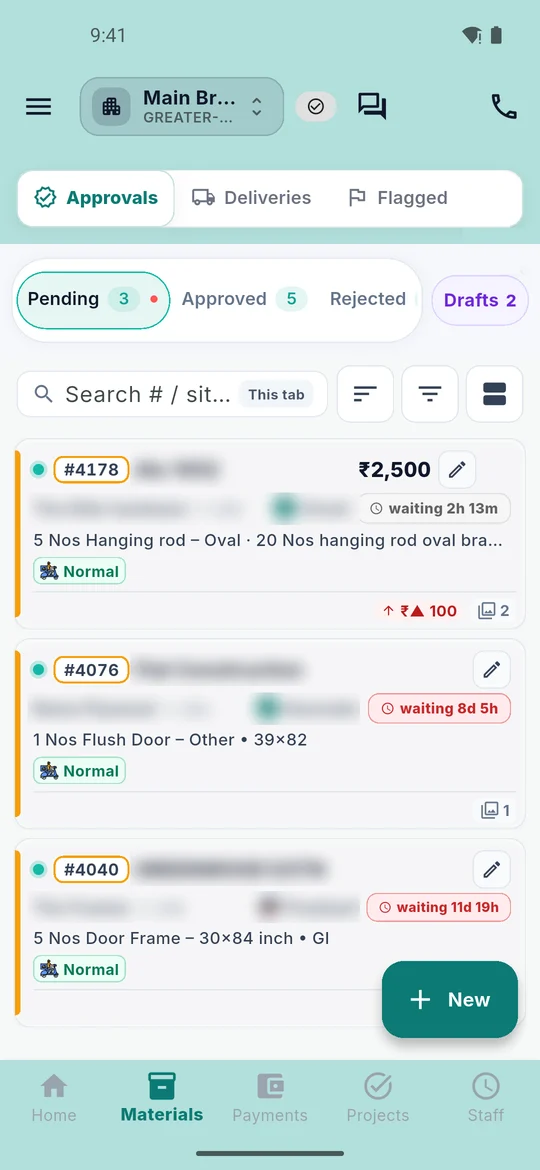
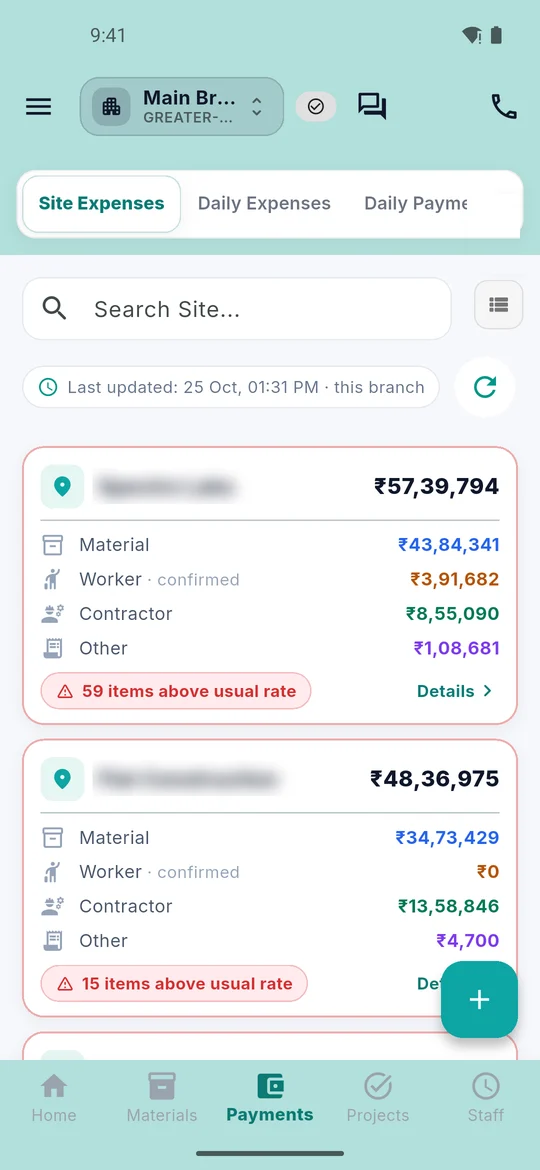
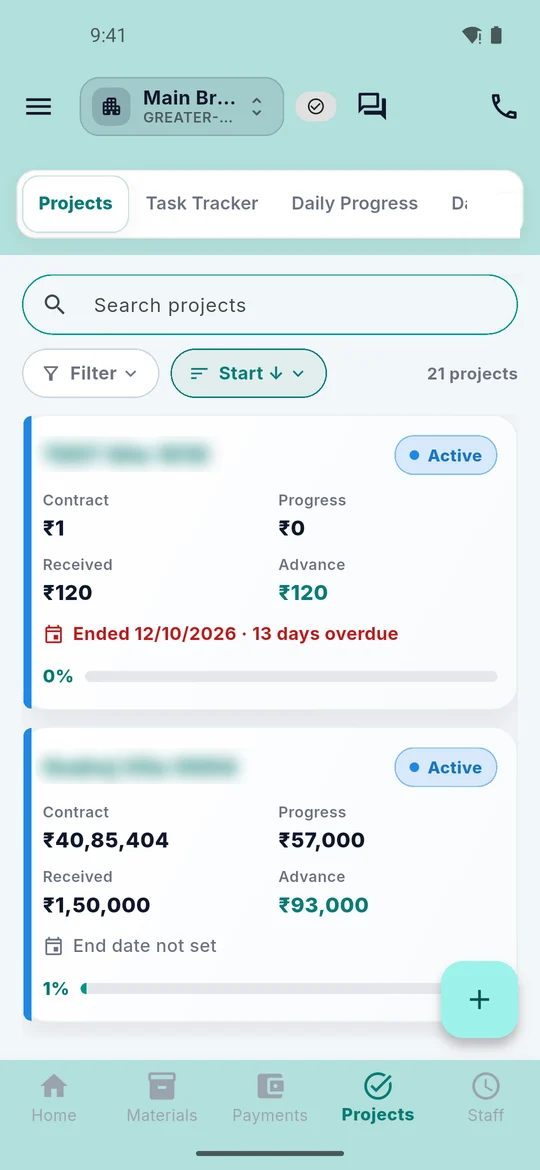
Short answer: a construction project management app keeps everything about a construction project on the same record: the BOQ, the plan and schedule, daily progress with photos, material, labour, payments, issues, variations and client updates, and lets the site team update it from a phone. General task apps cover only the plan. Trackovo covers the whole project for Indian builders, contractors and interior firms, with an Excel BOQ import and a Gantt timeline, every module in every plan, free labour logins, and prices from Rs 1,799 a month plus GST with a 14-day free trial.
What a construction project management app needs to do
General project tools (task boards, Gantt charts) were made for office teams. A construction project has a site, a BOQ, a labour force, material arriving every day, vendors and thekedars to pay, and a client waiting for updates. A construction project management app has to keep all of those on the same project, in a form a site engineer can update from the site, and show the owner whether the project is on time and on cost.
| Need | Why it matters on an Indian project | In Trackovo |
|---|---|---|
| BOQ as the backbone | The contract, the bills and the client’s questions all refer to BOQ lines | Excel BOQ import; each line becomes a task with unit, quantity and rate |
| Plan and schedule | Floors, flats and rooms repeat; dates slip | Tasks and subtasks by location, Gantt timeline, floor-cycle and room-cycle templates |
| Daily progress with proof | “Work done” must be checkable | Percent, units or milestone with a photo; pending, verified, confirmed |
| Delays with reasons | Delay claims and client disputes need a record | Every date change kept with its reason; monthly reasons view |
| Cost next to progress | A project can be 60% done and 90% spent | Material, labour, expenses and vendor payments site-wise, client payments alongside |
| Change control | Extra items are where margins go | Variations against the BOQ line, sent to the client for review |
| Client updates | Clients want photos and progress without calling | Client login with progress, approved photos, issues, variations and payments |
How a project runs in Trackovo
1. Set up the project
Create the project (the site), add the core team (project manager, site engineer, purchase manager, accountant) and invite labour and contractors free. Add the areas of the site, such as towers, floors, flats or rooms, so work can be tracked where it happens. Import the BOQ from Excel if you have one: pick the header row and map the columns for work item, category, details, unit, quantity, rate and progress. The mapping is saved for the next BOQ in the same format. More on BOQ software.
2. Plan the work
Break the work into tasks and subtasks for each area, with dates and the people or contractors responsible. Milestone templates, floor-cycle templates (for repeating RCC floor work) and room-cycle templates (for interiors) set up repeating work in one step, and subtasks can be copied from one area to another. Subtasks can carry a checklist, so the steps of a job are ticked on site. Each task has a Gantt timeline. By default only the admin can drag dates on it; the admin can give that right to others in User Management.
3. Plan each day
The daily plan turns the schedule into tomorrow’s work: which labour and contractors come, chowk labour by trade, which subtasks and issues will be worked on, and the material and machines needed. Plans can be made for one day or for a date range. Material on the plan becomes a draft material request. If a worker is booked on two sites for the same day, the planners get a conflict alert.
4. Track progress every day
The site engineer, supervisor or labour update progress on each subtask: percent done, units done out of the total, or a milestone, with a note. Site staff must attach at least one photo with every update, and a closure photo when a subtask reaches 100%. Updates move from pending to verified to confirmed by the roles your company chooses. Opening a daily plan shows how far the planned subtasks moved and any unplanned work that was done. The full daily workflow is on the DPR software page.
5. Record delays and their reasons
When a subtask’s dates change, the change is kept with the reason and who made it. The delay timeline lists every change for a project, and a “reasons this month” row shows at a glance whether work slipped for material, labour, client decisions or something else. That record is what you need when a client asks why the handover moved.
6. Keep material, labour and money on the same project
Material requests, approvals, orders, deliveries with photo proof and site stock all sit on the project (material management). Labour attendance with a selfie and site location feeds wages and thekedar settlement (labour management). Site expenses, vendor bills and payments are recorded site-wise (site accounts and payments), so you see what the project has consumed next to what it has finished. Trade progress shows how far each trade has moved.
7. Handle variations and client payments
When the client changes scope, log a variation against the BOQ line it belongs to and send it to the client for review in their own login, instead of arguing about it at the final bill. Billing milestones track the payment stages the client owes, from pending to due, invoiced and paid, and a stage can become due when trade progress reaches its threshold. Measurement book entries are recorded against the task and export to Excel or PDF; see the free measurement book format and RA bill format.
8. Close out snags and keep the client informed
Problems are raised as issues with a photo, and you choose which issues the client can see. Near handover, the punch list groups every snag raised under a BOQ task by room or zone, open items first. A client added to the project sees overall progress, task updates, the number of workers on site, the photos you approve, variations and recent payments, and has an approvals inbox for everything you have sent them to decide. Issues export as a PDF when someone wants a document.
Roles: who does what in the app
| Role | Uses Trackovo to | Paid login? |
|---|---|---|
| Owner / Admin | See all projects, cost and approvals; read the Daily Report; set permissions; reschedule on the Gantt | Yes (core user) |
| Project Manager | Plan tasks and daily plans, verify progress, edit variations, approve requests | Yes (core user) |
| Site Engineer | Daily plans, progress with photos, issues, material requests, deliveries, attendance | Yes (core user) |
| Purchase Manager | Turn requests into orders, manage vendors and rates | Yes (core user) |
| Accountant | Bills, payments, GST bills, settlements and exports | Yes (core user) |
| Rider | Deliveries and delivery proof | Yes (core user) |
| Labour, contractors, staff | Attendance, their own plans and work, progress photos, payment requests | No, free and unlimited |
| Client | Progress, approved photos, issues, variations, approvals, payments | No |
Construction app or general task tool?
| General task tool | Trackovo | |
|---|---|---|
| Tasks, schedules and Gantt | Yes | Yes, by site area, with templates for floors and rooms |
| BOQ and progress against BOQ | No | Yes, with Excel BOQ import |
| Daily plan and daily progress report | Build your own form | Built in, with photos and verification |
| Delay reasons | Comments, if someone writes them | Kept with every date change |
| Materials, stock and orders | No | Yes |
| Labour attendance and wages | No | Selfie and site-location attendance into wages |
| Variations and client approvals | No | Yes, in the client’s own login |
| Price model | Usually per user | Per company; labour, contractors and staff free |
If your team already plans in a scheduling tool and only needs site data, Trackovo can sit next to it; if you want one place for the plan, the site and the money, it can replace the spreadsheet and the WhatsApp group. Interior firms run fit-out projects on the same app; see interior project management software.
Construction project management apps compared
Published prices from each company’s own pricing page, read on 8 November 2026. They change; confirm before you buy.
| App | Published price | Charged |
|---|---|---|
| Trackovo | Rs 1,799 to Rs 5,399 a month, or Rs 17,999 to Rs 53,999 a year (launch offer), plus 18% GST | Per company; labour free |
| Onsite | Rs 12,000 + GST per user per year, minimum Rs 60,000 a year for 5 users (Business) | Per user |
| RDash | USD 1,000 per user per year (PRO), implementation extra | Per user |
| Project Studio | From Rs 60,000 a year for up to 5 users, plus taxes | By user band |
| Powerplay | Not published | Quote after a demo |
The full comparison, including Dzylo and buildcontrol and what five users cost on each, is in the construction management software guide. Also see best construction management software in India.
How to roll it out across your projects
Do not move every project at once. Pick the project with the most activity this month, set it up fully (BOQ, team, areas, vendors) and run it for two weeks. Use what you learn to set up the next ones. Projects that are nearly finished can stay on their old method; start every new project in the app from day one, so its full history is in one place.
Make one person responsible for the daily plan and progress on each site, and check in the first week that every update, material request and attendance entry is coming in. When the owner starts reading the Daily Report instead of making phone calls, the team follows. Running several at once? Read how to manage multiple construction sites.
A checklist before you pick a construction project app
- Can your site engineer log the day’s progress with a photo in a couple of minutes on a phone?
- Does progress tie to BOQ quantities, or only to photos and comments?
- Does every date change keep its reason?
- Are materials, labour and payments in the same app as the schedule?
- Can variations go to the client for review, with a record?
- Does the owner get one view of all projects?
- Do labour and contractors need paid logins?
- Is the price public, including renewal?
Pricing
| Plan | Monthly | Yearly | Core users | Active projects |
|---|---|---|---|---|
| Starter | Rs 1,799 | Rs 17,999 | 3 | 5 |
| Growth | Rs 2,999 | Rs 29,999 | 6 | 12 |
| Scale | Rs 5,399 | Rs 53,999 | 12 | 30 |
Launch-offer prices valid till 31 March 2027, plus 18% GST. Every module is in every plan; plans differ only in users and projects. Labour, contractors and staff log in free and unlimited. Extra core user Rs 419 a month, extra project Rs 239 a month. Live prices are always on the plans page; the free trial runs 14 days with no card.
Run your next project from one app
Start a free 14-day trial and set up one live project with your BOQ.
Frequently asked questions
What is a construction project management app?
It is an app that keeps everything about a construction project on the same record: the BOQ, tasks and schedule, daily progress with photos, material, labour, payments, issues, variations and client updates, and that the site team can update from a phone. General task apps cover only the plan; a construction app also covers the site and the money.
Which is the best construction project management software in India?
The right one depends on your projects. Check that progress ties to BOQ quantities, that date changes keep their reasons, that material, labour and payments sit on the same project, that variations can go to the client, and how users are priced. Trackovo publishes its price (from Rs 1,799 a month plus GST) with free labour logins; Onsite, Powerplay, RDash and Project Studio are other options Indian firms compare. Run one live project on your shortlist before you decide.
Can I import my BOQ from Excel?
Yes. Choose Import BOQ (Excel), pick the .xlsx file, select the header row and map the columns for work item, category, details, unit, quantity, rate and progress. Each row becomes a task with its unit, quantity and rate, and the mapping can be saved for the next BOQ in the same format. Trackovo reads the first sheet of the file.
Does Trackovo have a Gantt chart?
Yes. Each task has a Gantt timeline of its subtasks. By default only the admin can drag dates on it, and the admin can give that right to other roles in User Management. Every date change is kept with its reason in the delay timeline.
How do I track delays on a construction project?
In Trackovo every change to a subtask's dates is saved with the reason and who made it. The delay timeline lists all changes for the project, and a reasons-this-month row shows whether work slipped for material, labour, client decisions or other causes, which is the record you need when a client asks why handover moved.
How are variations and extra items handled?
Log a variation against the BOQ line it belongs to and send it to the client for review in their own login, so the change is agreed and on record before the final bill. Billing milestones track the payment stages the client owes, from pending to due, invoiced and paid.
Can clients see progress?
Yes. A client added to the project sees overall progress, task updates, the number of workers on site, the photos you approve, the issues you make visible, variations and recent payments, and has an approvals inbox for items you send them.
Is Trackovo only for large builders?
No. It is made for small and mid-size builders, contractors and interior firms, from one site to 30 or more. Starter covers 5 active projects, Growth 12 and Scale 30, and extra projects can be added for Rs 239 a month each.
Do labour and contractors need paid logins?
No. Labour, contractors and staff log in free and unlimited on every plan. Only core users count: Admin, Project Manager, Purchase Manager, Site Engineer, Accountant and Rider.
How much does Trackovo cost?
Trackovo publishes its prices, currently with a 70% launch offer: Starter is ₹1,799 per month or ₹17,999 per year for 3 core users and 5 active projects; Growth is ₹2,999 per month or ₹29,999 per year for 6 core users and 12 projects; Scale is for larger builders. 18% GST is extra. Every module is included in every plan, only the limits differ; labour, contractors and staff log in free and unlimited on every plan, and every new workspace starts with a 14-day free trial that needs no card.