Construction Management Software India: Materials, Labour, Payments And Daily Progress For Every Site In One App
Trackovo is construction management software made in India for builders, contractors and interior firms. The site team records attendance, material, expenses and progress on the phone; the owner sees every site on the web. Published prices from Rs 1,799 a month plus GST, and labour log in free.
No card needed · Android, iPhone and web · Labour log in free
In short: Construction management software is one system in which a construction company records what happens on its sites every day: labour attendance and wages, material from indent to stock, site expenses and vendor payments, GST bills, daily progress with photos and BOQ quantities, so the office and owner see the same numbers as the site. Trackovo is construction management software made in India for builders, contractors and interior firms: one Android, iPhone and web app, every module in every plan, labour and contractor logins free, from Rs 1,799 a month plus GST with a 14-day free trial.
What your team actually sees
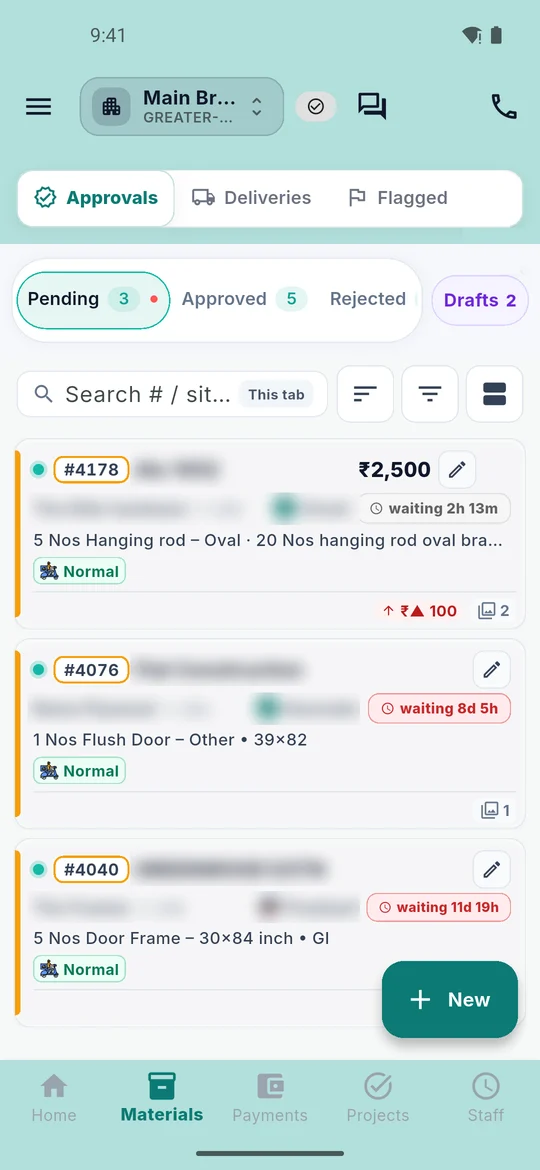
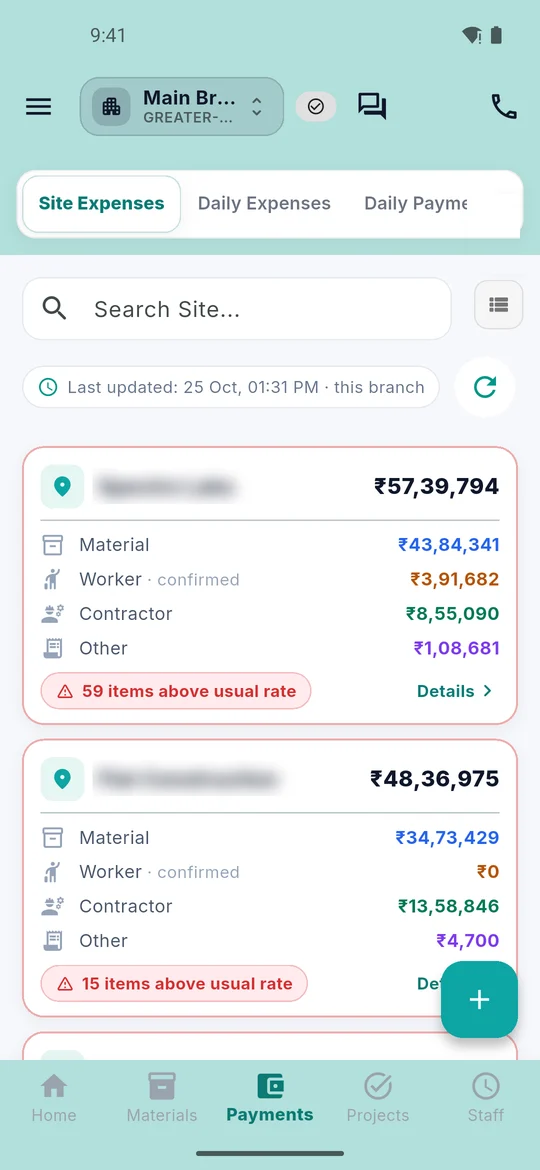
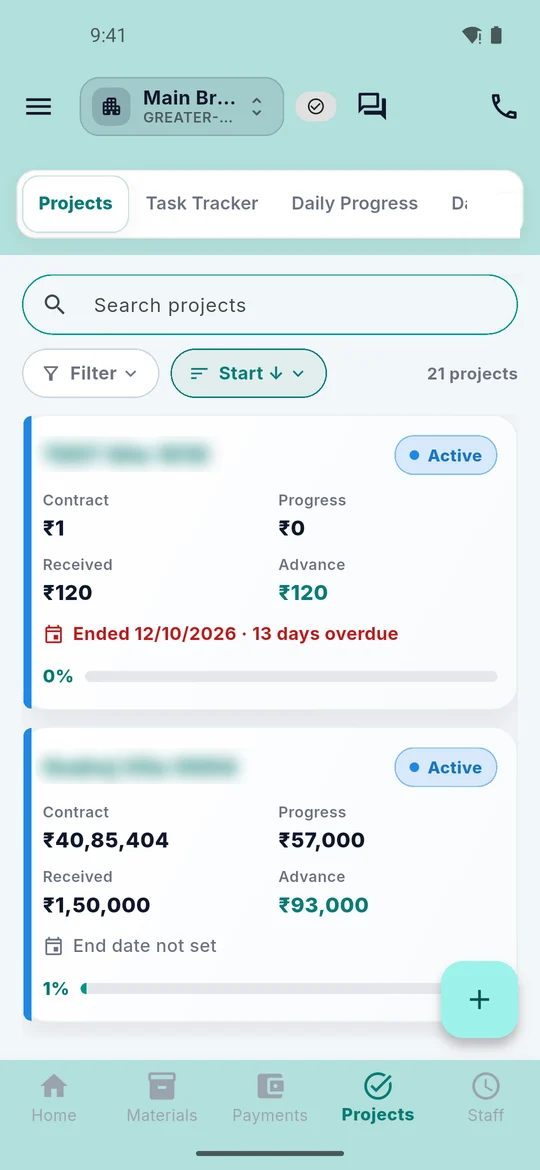
Short answer: construction management software is one app in which a construction company records what happens on its sites every day: labour attendance and wages, material from indent to stock, site expenses and vendor payments, daily progress with photos, and BOQ quantities. The office and the owner then see the same numbers as the site, the same day. For an Indian contractor the must-haves are a phone app that site staff will actually use, labour and thekedar settlement, GST bills, reports that can go out on WhatsApp, and a price that does not charge for every labourer. Trackovo covers these in every plan, from Rs 1,799 a month (launch offer, plus 18% GST), with a 14-day free trial. Onsite, Powerplay, RDash, Dzylo, Project Studio and buildcontrol are the other names Indian buyers usually compare; their published prices are in the comparison table below.
On this page
- What construction management software is, and what it is not
- Who it is for
- Module by module: what Trackovo does on an Indian site
- How it works: the first two weeks
- Who does what, and who you pay for
- Trackovo and the alternatives, with published prices
- Built for how Indian sites work
- How to choose construction software: 10 questions
- Trackovo pricing
- Guides, formats and tools
What construction management software is, and what it is not
Construction management software is the system a construction company uses to run its sites and its office from the same records. A site engineer marks attendance, raises a material request and logs the day’s progress on the phone. The purchase manager orders the material, the accountant pays the vendor and the labour, and the owner sees what every site has used, spent and finished, without calling anyone in the evening.
In India the same kind of product is sold under many names: construction ERP, construction project management software, site management app, or simply “construction app”. The names overlap. ERP products lean towards the office (purchase, accounts, approvals). Site apps lean towards the phone (attendance, deliveries, photos). Most money on an Indian site leaks in the gap between the two, so a useful system has to cover both ends.
| You searched for | What it usually means | Read |
|---|---|---|
| Construction management software | The whole company: sites, office, money and progress in one system | This page |
| Construction ERP software | Office-heavy: purchase, accounts, approvals, many users | Construction ERP software in India |
| Site management app | Phone-first: attendance, material on site, DPR, site cash | Site management software for construction |
| Construction project management app | Tasks, schedule, progress against the BOQ, client updates | Construction project management app |
| DPR software | The daily progress report from the site | DPR software and free DPR format |
| BOQ software | Running the bill of quantities on site | BOQ software with Excel import |
What it is not. Construction management software is not an estimating or drawing tool, it does not do 3D or BIM, and it does not replace your CA’s accounting software. Trackovo does none of those. It takes over after the drawings and the BOQ exist, and it hands clean numbers to your accountant.
Who it is for
- Builders and developers running two or more sites at once, who want one view of material, labour and money across all of them. See construction software for builders and developers.
- General contractors and thekedars who pay daily-wage and chowk labour every week and settle with sub-contractors at the end of a stage. See software for general contractors.
- Interior and fit-out firms whose clients want photos and progress, and whose margins depend on material control. See interior project management software.
- Owners, project managers, site engineers, purchase managers and accountants, each of whom sees the part of the system their role needs.
When you do not need it yet: one small site, one supervisor and a few vendors can run well on paper or Excel. Start with our free construction Excel templates and move when the second site opens. At the other end, a large company that needs a live Tally sync, SAP-style finance or a full sales CRM with quotations and automatic reminders should check those exact features with any vendor before buying, because Trackovo does not offer them (it has only a simple leads list on the web app).
Module by module: what Trackovo does on an Indian site
Every module below is in every Trackovo plan. The table is the summary; each module is explained underneath with the real screens behind it.
| Module | On site (phone) | In the office (web or phone) | Details |
|---|---|---|---|
| Material and purchase | Raise an indent; record the delivery with photo proof | Approve, order, check the rate, see stock per store and site | Material management |
| Labour attendance (hajiri) | Punch in with a selfie and the site location | Who is on which site; flagged punches; leave | Attendance and salary |
| Wages and thekedar settlement | Contractors raise payment requests from their own login | Daily wages, monthly salary sheet, advances, settlement | Labour management |
| Site expenses and payments | Log site kharcha and petty cash against the site | Verify and approve; site-wise totals; export to Excel | Site accounts and payments |
| Vendors | Pick the vendor on the request | Billed, paid and due for every vendor | Vendor management |
| GST bills and invoices | Upload the vendor’s GST bill | Missing bills flagged; sales and proforma invoices | Finance |
| Planning and DPR | Daily plan, progress with photos, issues | Daily Report for any date; Gantt timeline; delay reasons | DPR software |
| BOQ, measurement and variations | Measurement book entries against BOQ lines | Excel BOQ import; MB export; variations sent to the client | BOQ software |
| Machines and tools | Request, receive and hand over | Who holds which machine; repairs | Below |
| Deliveries and riders | Pickups and drops with delivery proof | Status of every delivery | Transport and delivery |
| Client view | Nothing extra for the site | The client sees progress, approved photos, issues and payments | Below |
| Owner reports | Nothing extra for the site | Daily Report at the time you set, plus a WhatsApp summary | Reports and dashboards |
Material and purchase: from indent to stock
Every item follows one path. The site raises a material request (the indent) for its project, a manager approves it, the purchase manager turns it into an order with a vendor, and the site records the delivery with photo proof. Stock is kept per store and per site. Material moved from one site or store to another goes through a Shifting request, so both ends of the move are on record and nothing “walks” between sites.
When the purchase manager types a rate, Trackovo compares it with what your company usually paid for the same item and shows whether it is above or below, before the order is saved. Items on a stock watchlist alert the admin and the purchase manager when stock falls below the level you set, and a request that has sat open for more than 30 days is flagged instead of being forgotten. Still on paper? Use the free material indent format and stock register format first.
Labour attendance: hajiri with proof
Labour, staff and contractors punch in on the phone with a selfie and the site location. A punch made away from the site is flagged for review, so proxy attendance is visible. A worker who forgets to punch out is closed automatically after 12 hours instead of staying open for days. Staff and labour can request leave in the app and see their balance. The project screen shows how many people were planned against how many are present. More in hajiri app for construction labour.
Wages, salary and thekedar settlement
Wages come from approved attendance, so the wage sheet and the attendance register can no longer disagree. Trackovo handles daily-wage labour, chowk labour hired by the day, and monthly staff, and keeps a monthly salary sheet for each person. Advances and overtime are recorded against the person they belong to. Contractors (thekedars) log in free and can raise a payment request from their own phone, and settlement shows what is owed, what was paid and what is still due. See how to track thekedar payments site by site.
Site expenses, payments and cash accounts
Site kharcha such as diesel, tempo fare, unloading and tea is logged against the site and a category, with the bill photo attached where there is one. Every expense and payment goes through the approval steps you choose: verify only, or verify and then approve, and you can require that two different people do the two steps. Cash and bank accounts are tracked, and money moved between them (for example office cash to the site engineer’s petty cash) is recorded as a transfer. Payment lists export to Excel for your accountant. The free site expense register format shows the same columns on paper.
Vendors
Every vendor has a running account: billed, paid and due, including advances held with the vendor. Trackovo blocks a second vendor with the same name, and a server check flags duplicates that slip in from older app versions, so one supplier’s dues are never split across two names.
GST bills and invoices
When a purchase is marked as a GST purchase, the vendor’s GST bill is uploaded against it. A daily check flags GST purchases that still have no bill, so input tax credit is not lost to a missing paper. The Billing tab totals GST on purchase bills. On the sales side you can make sales invoices and proforma invoices with your GSTIN, the client’s GSTIN, HSN or SAC codes and GST rates.
Planning, daily progress and the DPR
The project manager or site engineer makes a daily plan for each site: which labour and contractors come, chowk labour by trade, which tasks will be worked on, and the material and machines needed. Material on the plan becomes a draft material request. During the day the team logs progress on each task as a percent, units done or a milestone, with a note and a photo, and raises problems as issues with a photo. Issues can be exported as a PDF. Each task has a Gantt timeline; only the admin can drag dates by default, and every date change is kept with its reason, so a monthly view shows why work slipped. Floor-cycle templates set up repeating RCC floor work in one step. The full workflow is on the DPR software page, with a free DPR format.
BOQ, measurement book and variations
Import the BOQ you already have in Excel: pick the header row, map the columns once, and every line becomes a task with its unit, quantity and rate. Measurement book entries are recorded against the task they belong to and export to Excel or PDF. When the client changes scope, the variation is logged against the BOQ line and can be sent to the client for review in their own login. Billing milestones track the payment stages the client owes, from pending to due, invoiced and paid. See BOQ software and the free measurement book format.
Machines, tools and deliveries
Machines and hand tools have their own register. A site requests a machine, it is issued and handed over with a record, and repairs are logged, so you always know which site holds the mixer or the shuttering. Riders (your delivery staff) see their pickups and drops in the app and record delivery proof; see transport and delivery.
Client view and owner reports
A client added to the project sees overall progress, task updates and issues, the number of workers on site, the photos you approve, variations and recent payments. You decide which photos the client sees. For the owner, the Daily Report for any date brings together attendance, expenses, tasks done and overdue, issues, material requests and daily plans, with a “needs attention” list. It is sent automatically at the time you set, and the admin can also send the summary to the team as a WhatsApp text.
How it works: the first two weeks
- Sign up. Create a workspace at console.trackovo.app/signup. The 14-day free trial starts with Starter limits and needs no card.
- Add your sites and stores. Each site is a project; stores hold stock.
- Invite the team by role. Core users (Admin, Project Manager, Purchase Manager, Site Engineer, Accountant, Rider) and free logins for labour, contractors and staff. Each role sees only its own screens, and the admin can change what each role may do in User Management.
- Bring your data. Import the BOQ from Excel. The Trackovo team helps you bring in sites, materials, vendors and labour lists from Excel or another app.
- Choose approval steps for expenses, payments and progress: who verifies, who approves.
- Day one on site: attendance with selfie, the first material request and the first delivery with photo.
- Every day after: the morning daily plan, progress with photos, and the owner reads the Daily Report.
- End of week one: compare the app’s stock and wages with your own count, and fix the gaps while the team is still learning.
- End of the trial: pick a plan on the plans page; everything entered during the trial carries on.
Start with one site and two modules (attendance and material deliveries are the usual pair), then add the rest. Our guide to managing multiple construction sites covers the rollout.
Who does what, and who you pay for
| Role | Uses Trackovo to | Paid login? |
|---|---|---|
| Owner / Admin | See every site, approve, read the Daily Report, set permissions | Yes (core user) |
| Project Manager | Plan work, verify progress, approve requests, watch cost | Yes (core user) |
| Site Engineer | Attendance, material requests, deliveries, progress, issues, site expenses | Yes (core user) |
| Purchase Manager | Turn requests into orders, manage vendors and rates | Yes (core user) |
| Accountant | Bills, payments, GST bills, settlements, exports | Yes (core user) |
| Rider | Pickups, drops and delivery proof | Yes (core user) |
| Labour, contractors, staff | Attendance, their own plans and work, payment requests, leave | No, free and unlimited |
| Client | Progress, approved photos, variations, payments | No |
Trackovo and the alternatives, with published prices
These are the products Indian buyers most often put next to each other. Prices are copied from each company’s own pricing page on 8 November 2026 and can change at any time, so confirm them with the vendor before you decide. We make Trackovo, so read our own row with the same care.
| Option | Published price | How it is charged | Good to know |
|---|---|---|---|
| Excel + WhatsApp | Free | – | Fine for one site. No approvals, no stock ledger, totals counted by hand. |
| Trackovo | Rs 1,799 a month or Rs 17,999 a year (Starter) to Rs 5,399 a month or Rs 53,999 a year (Scale), launch offer till 31 Mar 2027, plus 18% GST (plans) | Per company: 3, 6 or 12 core users; labour, contractors and staff free | 14-day trial, no card. Every module in every plan. A young product with few public reviews; no live Tally link. |
| Onsite | Business Rs 12,000 + GST per user per year, billed yearly, minimum Rs 60,000 a year for 5 users; Business+ Rs 15,000 + GST per user per year, minimum Rs 75,000 (onsiteteams.com/onsite-pricing) | Per user | Large install base (10 lakh+ on Google Play); positions itself for small to large firms. |
| Powerplay | Not published; its pricing address returned “not found” on 8 Nov 2026 | Quote after a demo | Large install base (10 lakh+ on Google Play). Ask for a written quote. |
| RDash | PRO USD 1,000 per user per year, paid yearly in advance; implementation and onboarding priced separately (rdash.ai/pricing) | Per user | Lists design management, client BOQ sharing and Tally and other integrations on its site. |
| Dzylo | Growth Rs 6,000, Pro Rs 11,000, Enterprise Rs 15,000 per user per year, plus tax (dzylo.ai/pricing) | Per user | Aimed at interior firms. |
| Project Studio | Growth Rs 60,000+ a year for up to 5 users; Pro Rs 2,00,000+ for up to 15; Enterprise Rs 4,00,000+ for up to 25; plus taxes (projectstudio.ai/pricing) | Per plan, by user band | Aimed at interior firms; lists a CRM in its plans. |
| buildcontrol | Rs 21,000 a year or Rs 14,000 for 6 months, plus 18% GST (buildcontrol.in/price-plan) | Per company plan with a member limit | Indian construction app with a published price. |
| NYGGS, Nway ERP and other ERPs | Not checked by us | Ask for a written quote | Usually aimed at larger firms with an office ERP team. |
What five office users cost for a year, at published prices (before GST)
- Trackovo: Growth Rs 29,999 (6 core users, 12 projects), or Starter plus two extra users Rs 26,387 (5 projects). Labour, contractors and staff are not counted.
- Onsite Business: Rs 60,000 (the stated minimum for 5 users).
- Dzylo: Rs 30,000 on Growth to Rs 55,000 on Pro (5 users x the per-user price).
- Project Studio Growth: Rs 60,000 or more.
- RDash PRO: USD 5,000, plus implementation.
- buildcontrol: Rs 21,000 for its yearly plan; check its member and project limits on its site.
- Powerplay: ask for a quote.
Price is only one line. Where the others may suit you better: Onsite and Powerplay have far larger user bases and more reviews; RDash lists design management and accounting integrations; Dzylo and Project Studio are built around interior design firms. Where Trackovo is different: a published rupee price per company, every module in every plan, and free logins for the people who are tracked (labour, contractors, staff). For head-to-head detail read Trackovo vs Onsite, Trackovo vs Powerplay, Trackovo vs RDash, Trackovo vs Dzylo, Trackovo vs buildcontrol, or the best construction management software in India list.
Built for how Indian sites work
- Rupees and GST. Prices are in rupees with 18% GST shown separately, and checkout runs on Razorpay with UPI, Indian cards and net banking. Purchase GST bills, missing-bill flags and GST sales invoices are covered above.
- Tally. Trackovo does not connect to Tally and has no Tally export. Your accountant enters the figures in Tally from Trackovo’s records; vendor ledgers can be downloaded as PDF. If a live Tally sync is a must for you, ask any vendor to show it working on your own data before you pay.
- WhatsApp. Keep WhatsApp for talking. Move the records (attendance, material, payments, progress) into the app, and send the Daily Report summary to the team as a WhatsApp text.
- Hindi for the people on site. Labour and contractor screens can be switched to Hindi from the language button; office screens stay in English.
- Labour does not cost a seat. Labour, thekedars and site staff log in free and unlimited on every plan. Only office and site roles count as users.
- Site words, not office words. Indent, hajiri, chowk labour, petty cash, challan, thekedar settlement and measurement book are all first-class records, not workarounds.
- Made in India. Trackovo is built by Trackovo AI Technologies in Greater Noida, and support comes from the team that builds it, on WhatsApp and phone at +91 95825 81238.
How to choose construction software: 10 questions
- Can a site engineer mark attendance and log the day’s work on a phone in a few minutes?
- Is attendance backed by a photo and location, and does it flow into wages without retyping?
- Does material follow one path from indent to approval, order, delivery and stock, with transfers between sites?
- Can you set who verifies and who approves each expense and payment?
- Does every vendor and contractor have a running account of billed, paid and due?
- Are GST bills tracked, and does the system tell you when one is missing?
- Can you import your BOQ from Excel and track work done against it?
- Does the owner get one view of all sites every evening?
- Do labour and contractors need paid logins?
- Is the price published, and what happens at renewal?
The longer version, with what to ask in a demo, is how to choose a site management app: 15 questions.
Trackovo pricing
| Plan | Monthly | Yearly | Core users | Active projects |
|---|---|---|---|---|
| Starter | Rs 1,799 | Rs 17,999 | 3 | 5 |
| Growth | Rs 2,999 | Rs 29,999 | 6 | 12 |
| Scale | Rs 5,399 | Rs 53,999 | 12 | 30 |
Launch-offer prices valid till 31 March 2027, plus 18% GST; companies that join before then keep the price while they stay subscribed. Every module is in every plan; plans differ only in core users and active projects. Labour, contractors and staff log in free and unlimited. Extra core user Rs 419 a month, extra project Rs 239 a month. You can pay monthly, quarterly, half-yearly or yearly. Live prices are on the plans page, and the 14-day free trial needs no card.
Guides, formats and tools
Everything on this site about running construction sites, in one place.
Run your next site on Trackovo
Start the 14-day free trial with one live site. No card, every module, labour logins free.
Frequently asked questions
What is construction management software?
It is software that a construction company uses to run its sites and its office from the same records: labour attendance and wages, material requests, deliveries and stock, site expenses and vendor payments, daily progress with photos, BOQ quantities and client updates. The site team enters the facts on a phone as they happen, and the office and owner see them the same day instead of collecting Excel files and WhatsApp messages.
Which is the best construction management software in India?
There is no single best one; it depends on your size and what you need most. Small and mid-size contractors who want a published price and free labour logins can start with Trackovo (from Rs 1,799 a month plus GST, 14-day free trial). Onsite and Powerplay have the largest user bases among Indian construction apps; RDash, Dzylo and Project Studio are often chosen by interior and fit-out firms. Shortlist two, run each on one live site for two weeks, and compare the wage sheet and stock with your own count.
How much does construction management software cost in India?
Published prices checked on 8 November 2026: Trackovo Rs 17,999 to Rs 53,999 a year per company (launch offer) plus GST; Onsite Business Rs 12,000 plus GST per user per year with a minimum of Rs 60,000 a year; Dzylo Rs 6,000 to Rs 15,000 per user per year plus tax; Project Studio from Rs 60,000 a year for up to 5 users; buildcontrol Rs 21,000 a year plus GST; RDash USD 1,000 per user per year. Powerplay does not publish a price. Prices change, so confirm with each vendor.
Is there free construction management software?
Excel and WhatsApp are free and work for one small site; free construction Excel templates for DPR, attendance, stock, BOQ and RA bills are on trackovo.app. Trackovo itself has a 14-day free trial with every module and no card, but no free-forever plan. Labour, contractor and staff logins are free on every paid plan.
What is the difference between construction ERP and construction management software?
The terms overlap. Construction ERP usually means an office-heavy system for purchase, accounts and approvals with many office users. Construction management software is the wider term for running sites and office from the same records, and site management apps focus on the phone side: attendance, deliveries, photos and the daily report. Trackovo covers both the site and the office side in one app.
Does Trackovo work with Tally?
Trackovo does not connect to Tally directly. There is no Tally export either; your accountant enters the figures in Tally from the records in Trackovo. If a live Tally sync is a must, ask any vendor to show it working on your own data before you buy.
Does Trackovo handle GST bills?
Yes. When a purchase is marked as a GST purchase, the vendor's GST bill is uploaded against it, and a daily check flags GST purchases that still have no bill. The Billing tab totals GST on purchase bills, and you can make sales invoices and proforma invoices with GSTIN, HSN or SAC codes and GST rates.
Can labour and site staff use the app in Hindi?
Labour and contractor screens can be switched to Hindi with the language button in the app. Office screens such as admin, accounts and purchase stay in English.
Do labour and contractors need paid logins?
No. Labour, contractors and staff log in free and unlimited on every Trackovo plan. Only core users count: Admin, Project Manager, Purchase Manager, Site Engineer, Accountant and Rider. Starter includes 3 core users, Growth 6 and Scale 12.
Is Trackovo suitable for interior and fit-out firms?
Yes. Interior and fit-out firms use the same app: room-cycle templates set up repeating room work, progress photos can be shared with the client, variations go to the client for review, and the punch list groups snags by room before handover.
Which devices does Trackovo run on?
Android (Google Play), iPhone (App Store) and any web browser at console.trackovo.app. Site staff normally use the phone app; owners and the office often use the web app for approvals, payments and reports.
How much does Trackovo cost?
Trackovo publishes its prices, currently with a 70% launch offer: Starter is ₹1,799 per month or ₹17,999 per year for 3 core users and 5 active projects; Growth is ₹2,999 per month or ₹29,999 per year for 6 core users and 12 projects; Scale is for larger builders. 18% GST is extra. Every module is included in every plan, only the limits differ; labour, contractors and staff log in free and unlimited on every plan, and every new workspace starts with a 14-day free trial that needs no card.