Construction ERP Software India: One System From Indent To Payment, Built For Site Teams
Trackovo links material requests, purchase orders, deliveries, labour attendance, vendor bills and GST bills in one construction ERP that your site engineer can use on a phone. One price for the whole company.
No card needed · Android, iPhone and web · Labour log in free
Why Indian contractors give up on ERPs
Built for desks, used on sites
Most ERPs assume people sit at a computer. On a construction site the storekeeper, engineer and supervisor are on their feet all day with only a phone. If an entry takes several screens, it does not get made.
Per-user pricing punishes a site team
A site has many people who need to log in for a minute a day. When every login is a paid seat, companies give the app to two people and the rest goes back to registers and WhatsApp.
Site and accounts never match
Material reaches the site on one challan, the bill comes to the office later, and the payment goes out from a third record. Without one chain, nobody can say what a project has really cost.
Months of setup
Large ERPs need consultants, custom masters and long training. A builder running five sites needs something that works in the first week.
What your team actually sees
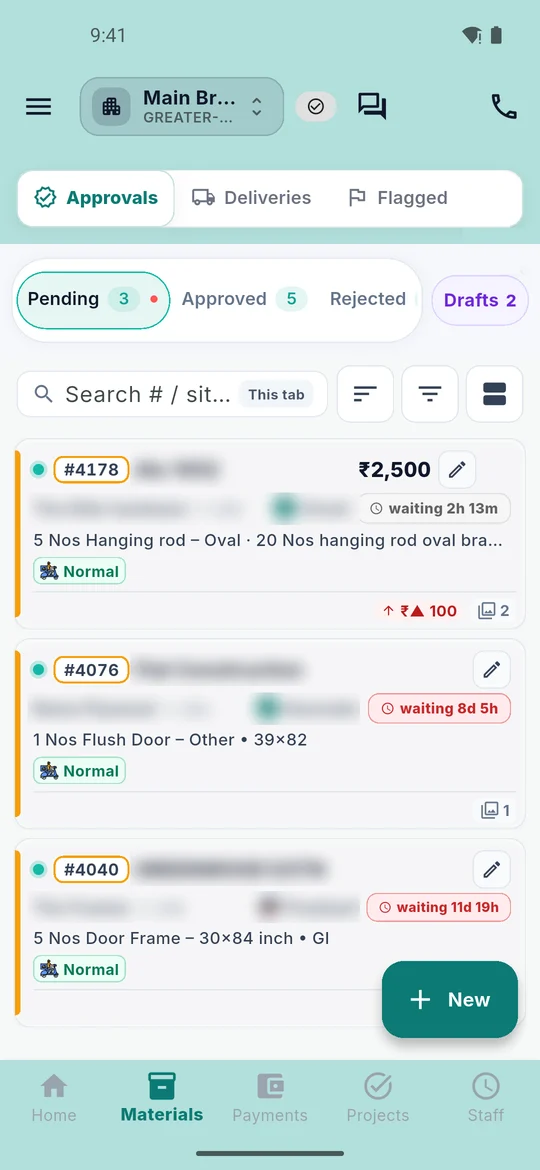
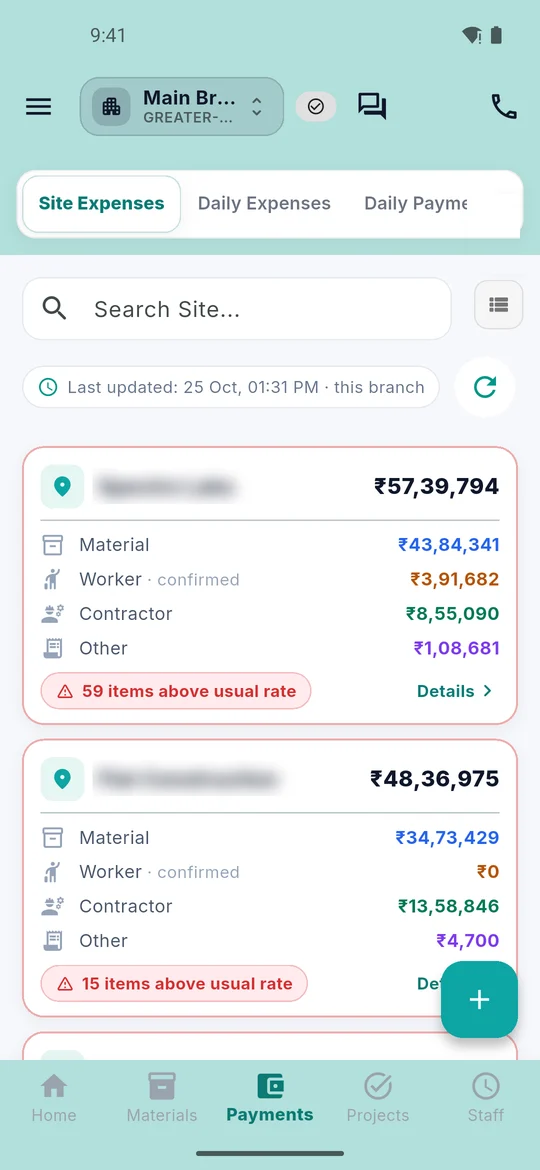
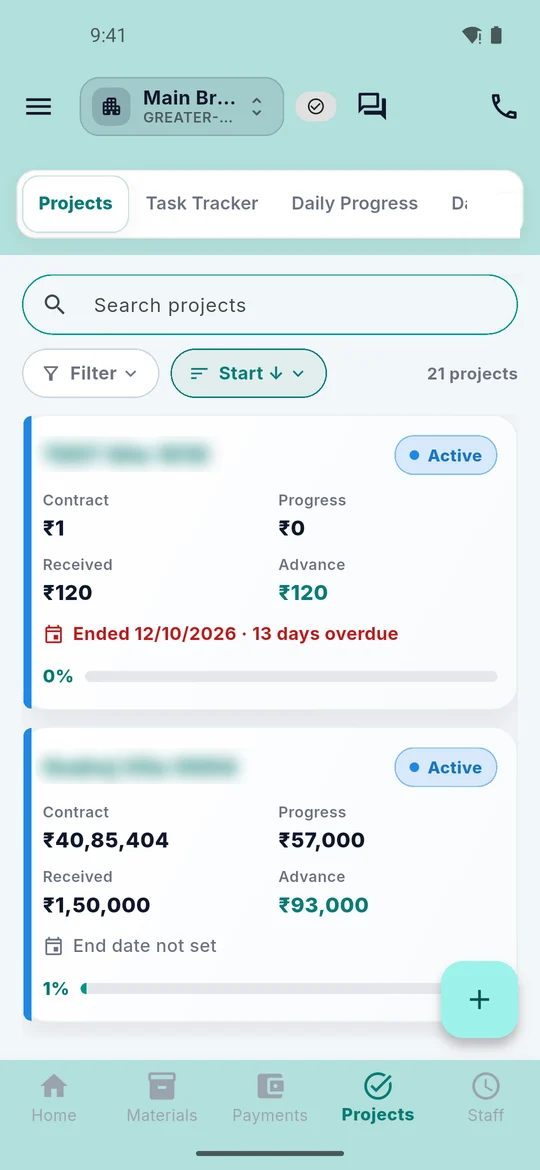
What a construction ERP should actually connect
An ERP for a construction company is not one screen. It is the chain that links what was asked for on site, what was bought, what arrived, who worked, and what was paid. If any link is missing, the owner sees the gap only when cash runs short. In Trackovo the chain looks like this:
- Material request (indent). The site engineer raises a request on the phone with item, quantity and site.
- Approval. The project manager or purchase manager approves, edits or rejects it. The approval stays on record.
- Purchase order. The purchase team turns the approved request into a PO to a vendor.
- Delivery and GRN with photo proof. When the truck arrives, the site records the goods received with a photo, and the site stock ledger updates.
- Vendor bill and dues. The bill is recorded against the vendor, and the vendor’s dues and settlements stay in one history.
- Payment. Payments are recorded site-wise, so the project’s cost and the vendor’s balance move together.
Labour runs in parallel: attendance marked with a photo and GPS location flows into salary and contractor bills. Petty cash and site expenses are logged against the site. Everything is recorded against the project and shows on owner dashboards across all sites.
The modules, and what each one does
| Module | What it covers in Trackovo |
|---|---|
| Material management | Requests, approvals, purchase orders, GRN with photo proof, site stock ledger, store and site transfers |
| Attendance and salary | Labour attendance with photo and GPS location, flowing into salary and contractor bills |
| Finance | Site-wise expenses, vendor bills and dues, petty cash, project-wise costs, GST purchase bills and GST sales invoices |
| Vendor management | Vendor history, rates and settlements |
| DPR and BOQ | Daily progress reports and progress against the BOQ, including Excel BOQ import |
| Transport | Delivery requests and delivery proof |
| Reports | Owner dashboards and reports across all sites |
Every module is included in every plan. You do not buy “inventory” or “payroll” as add-ons.
Construction ERP vs Tally plus Excel vs a large ERP
| Tally + Excel + WhatsApp | Large general ERP | Trackovo | |
|---|---|---|---|
| Who enters data | Office, after the fact | Trained desk users | Site team on the phone, as it happens |
| Material chain | Separate sheets and paper challans | Yes, heavy setup | Request → approval → PO → GRN with photo → bill → payment |
| Labour attendance | Register or sheet | Often a separate HR tool | Photo and GPS attendance into salary |
| Accounts | Tally | Built in or replaces Tally | GST bills and invoices recorded; your accountant keeps Tally (no Tally export) |
| Pricing | Low, but hidden cost in leaks | Per user, plus implementation | Per company; labour logins free |
| Time to start | Already running | Months | Free 14-day trial; team helps import Excel data |
Does Trackovo replace Tally?
No, and it does not need to. Most Indian contractors keep Tally for statutory accounts because their CA works in it. Trackovo is where site transactions are captured first, with GST bills attached, and your accountant then enters them in Tally (there is no Tally export or sync). The accountant gets cleaner data; the site team never has to learn accounting software.
How to choose a construction ERP: a checklist
- Can a site engineer finish a material request on a phone in under a minute? Try it yourself during the trial, on a real site.
- Who has to pay for a login? Count the people on your sites. If labour and contractors need paid seats, the real price is many times the quoted one.
- Is the full chain linked? Ask to see one item from request to payment on a single screen.
- Is every module included? Check whether GPS attendance, inventory or Tally export are extra add-ons.
- Is the price public? If you have to ask for a quote, ask what renewal will cost too.
- Can you leave with your data? Ask for data export terms in writing.
For a side-by-side of the Indian options, read best construction management software in India and Onsite vs RDash vs Trackovo pricing.
Pricing
| Plan | Monthly | Yearly | Core users | Active projects |
|---|---|---|---|---|
| Starter | Rs 1,799 | Rs 17,999 | 3 | 5 |
| Growth | Rs 2,999 | Rs 29,999 | 6 | 12 |
| Scale | Rs 5,399 | Rs 53,999 | 12 | 30 |
Prices are launch-offer prices, valid till 31 March 2027, plus 18% GST. Every module is in every plan; plans differ only in users and projects. Labour, contractors and staff log in free and unlimited. Extra core user Rs 419 a month, extra project Rs 239 a month. Live prices are always on the plans page.
Getting started in the first week
- Start the free trial and add your company, sites and core users (office and site roles).
- Add vendors and items, or send your existing Excel lists and the team helps import them.
- Invite labour and contractors; their logins are free.
- Run one live material request through to payment on a real site.
- Open the owner dashboard at the end of the week and check one site’s cost against your own numbers.
Trackovo is built in Greater Noida by people who run construction sites. Support is founder-led on WhatsApp and phone: +91 95825 81238.
Frequently asked
Is Trackovo a full construction ERP?
Does it handle GST?
Can it run many projects in many cities?
How much does Trackovo cost?
Do labour and contractors need paid logins?
Is there a free trial?
Which devices does it run on?
Can I bring my existing data from Excel or another app?
See your real project cost, the same day
Run one live material request from site to payment during the free trial.