
Construction Management Software in Dubai
Trackovo is a construction and interior site-management app for fit-out firms, villa contractors and small civil contractors in Dubai. If you run several sites across the emirate, with subcontractors, daily material deliveries and handover deadlines, Trackovo keeps the record of all of them in one place — from labour attendance to material approvals to the final snag list.
Android · iOS · Web
14-day free trial
No credit card required
Three Dubai site problems and what the app records for each
Fit-out handover snags and photos
Handover in fit-out work comes down to the snag list. In Trackovo, every snag or defect is logged with a photo, assigned to a person, and tracked until it is closed. There is also a site diary so your site engineer can record what happened each day. When the client or consultant walks the unit, you already have your own photo record of every raised and cleared item.
Subcontractor running bills and advances
Every subcontractor agreement starts clean and ends in an argument about what was paid and what was done. Trackovo keeps a labour and contractor ledger per site: daily attendance, agreed wages or rates, advances given, and settlement at the end. When the sub says he is owed more, you open the record instead of arguing from memory.
Material deliveries to towers and villas
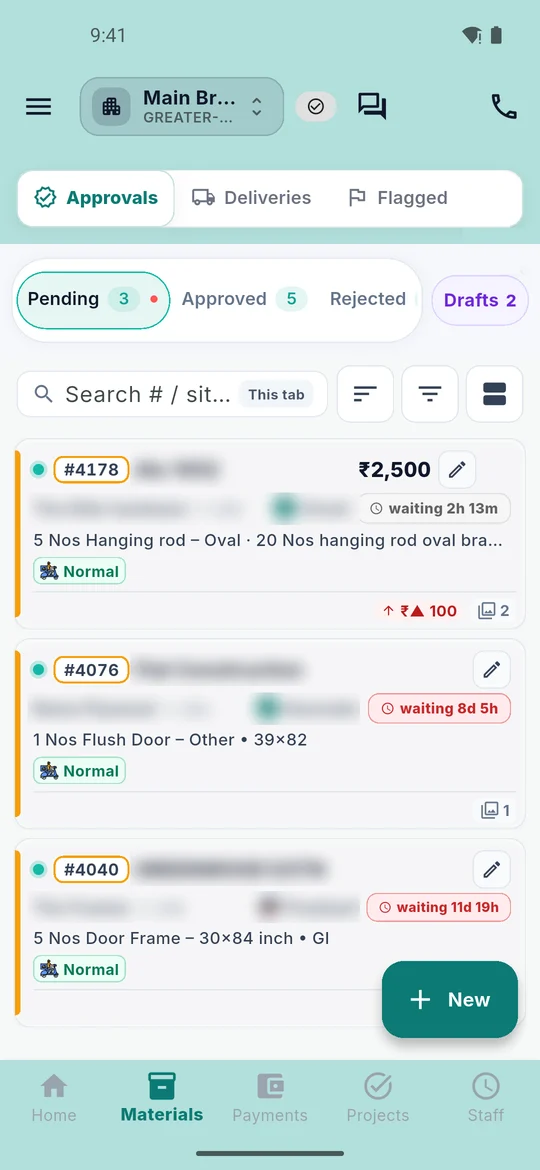
Deliveries to a tower or a villa cluster often arrive without paperwork. In Trackovo, a material request (indent) is raised on site, approved in the office, a purchase order is issued, and when the goods land the site team records a goods received note (GRN) with a photo as proof. The site stock ledger and store-to-site transfers follow from that, so you know what was ordered, what arrived and where it went.
A day on a Dubai site with Trackovo
1. Morning attendance
The foreman marks labour attendance on the phone. Each entry is backed by a photo and the GPS location of the site, and daily wages are recorded against each worker. This is not biometric or face recognition — the proof is the photo plus the location.
2. An indent is raised
Mid-morning, the site engineer sees that gypsum boards or block work material will run out in two days. He raises an indent from the phone, with quantity and item, before the supplier cut-off time.
3. The office approves the PO
In the office, the purchase manager sees the indent on the web app, checks the vendor and the rate, and issues the purchase order. The approval trail stays in the app; nothing depends on a WhatsApp message that gets lost.
4. Delivery with GRN photo proof
When the truck reaches the site, the receiving team records a GRN with a photo of the delivered goods. Short deliveries and damaged material are caught on the spot, while the driver is still there, not three days later on a phone call.
5. Progress against the BOQ line
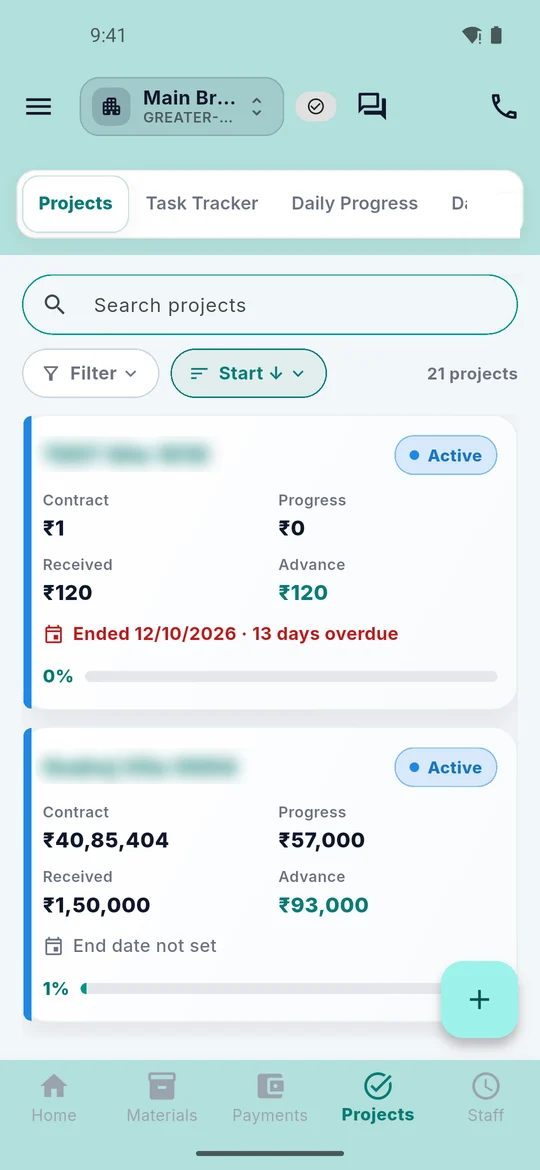
In the afternoon, completed work is recorded against the matching BOQ line, either directly or through the measurement book. Variations are raised on a BOQ line when the client asks for something outside the agreed scope, so the extra work has a number attached to it from day one.
6. Evening daily report
The day closes with a daily progress report (DPR) with photos. Clients with a login can see progress themselves, which means fewer evening calls asking what happened on site today.
Office in Business Bay, sites across the emirate
Many Dubai contracting companies run the office from Business Bay, Al Quoz or Deira while the sites sit anywhere from Jumeirah to Dubailand to the villa plots on the edge of the emirate. Trackovo fits that shape of work. The office team works on the web app: approving indents, issuing purchase orders, checking vendor bills, reading reports and dashboards across all sites. The site team works on the phone: attendance, GRNs, snags, tasks and daily reports. Both sides see the same data at the same time, so nobody re-types anything into a spreadsheet at the end of the week.
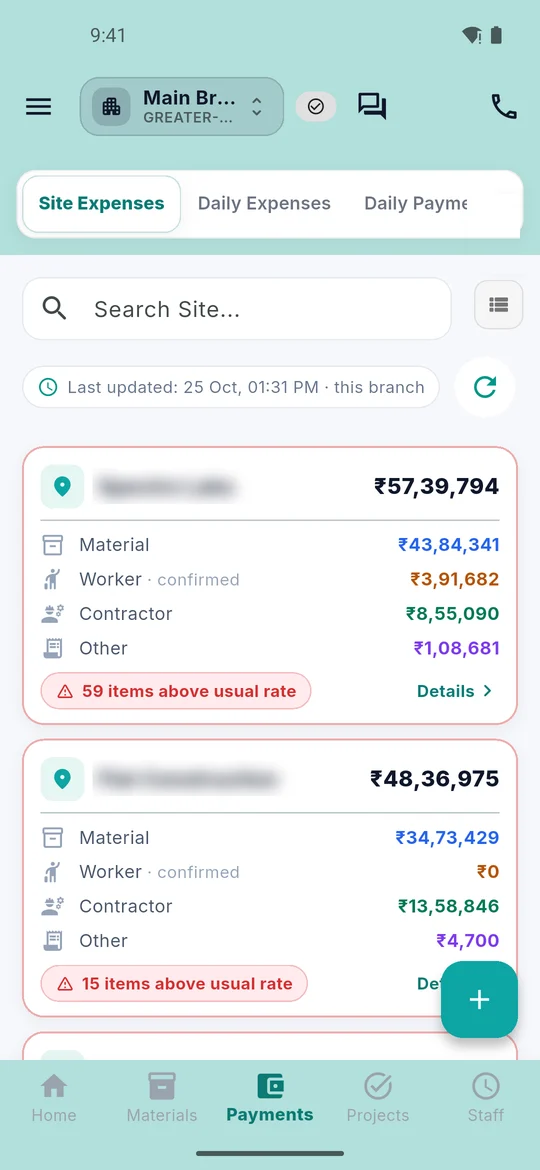
- Site-wise payments, expenses and petty cash recorded where they happen
- Vendor bills and dues visible per vendor, not per spreadsheet
- Machines and tools register so equipment moved between sites is tracked
- Reports and dashboards across all sites in one place
What it does not do
We would rather tell you the limits now than have you find them in week three. Trackovo does not do any of the things below, and we will not pretend otherwise on a demo call.
- No offline working — the phone needs a network connection to record entries
- No biometric or face-recognition attendance; proof is photo plus GPS
- No design tools, no 3D, no drawings markup
- No construction CRM or lead pipeline for sales
- No WPS or SIF payroll file generation — you keep the attendance and wage record, filing stays with your payroll process
- No live accounting integration — there is an export file for Tally; for UAE accounting packages you export your data and import it
- No labour camp or accommodation management
- No tender or e-procurement module
- English interface only, no Arabic yet
- Amounts outside invoices currently show with the Indian rupee symbol and lakh and crore grouping — see the FAQ below
Starting in Dubai
Trackovo was built in India and is used daily by builders and contractors there; it is now offered in the United Arab Emirates. The recommended way to start is small and real: pick one live Dubai site, run the 14-day free trial on it with no card needed, and let your own site team prove whether it saves them time. The team helps you import your existing Excel BOQ and registers, so you are not typing months of records into a phone. Support is founder-led over WhatsApp and phone (+91 95825 81238) and email prashant@trackovo.app, and you can ask for an export of your data at any time. Sign-in is by mobile number with a one-time code; the sign-in screen has a country-code picker, so UAE numbers work. The app is listed on the UAE Google Play Store and the UAE App Store.
Frequently asked questions
Which currency does the app show?
Outside invoices, amounts in the app are currently displayed with the Indian rupee symbol and Indian number grouping (lakh and crore). Invoice currency can be set to AED on each invoice. Dirham display across the whole app is something to discuss on the demo call; we do not promise it and we do not give a date for it. We would rather say this plainly here than surprise you after you sign up.
How is Trackovo priced for UAE companies?
Pricing for UAE companies is confirmed on the demo call. The price is per company, not per user: labour, contractors and site staff log in free and unlimited, and only office roles (admin, project manager, purchase manager, site engineer, accountant) count as users. The public India price list at /plans/ shows the structure: Starter, Growth and Scale, monthly or yearly, with every module included in every plan. There is a 14-day free trial and no card is needed.
Is the app available in Arabic?
No. The interface is in English only at present. Many site teams in Dubai work in English every day, but if you need Arabic screens for your staff or your clients, Trackovo is not the right fit today. We do not have a date to share for an Arabic interface, so we will not hint at one.
Does Trackovo file anything with Dubai Municipality or RERA?
No. Trackovo does not submit anything to Dubai Municipality, RERA or any other authority. It does not generate permits, notifications or statutory filings. What it does is keep the site record behind your submissions and handovers: photos, snags, attendance, material received, progress against BOQ and daily reports. Any filing with authorities stays with your own process and your own QHSE or document team.
Can my subcontractors log in too?
Yes. Labour, contractors and site staff log in free and unlimited; only office roles count as paid users. So your fit-out subcontractor or your MEP sub can mark attendance, receive tasks and update progress in the same app without adding to your licence cost. Their daily wages, advances and settlements are tracked per site, which is what makes the running bill conversation easier at the end of the month.
Can I raise invoices with a 5% VAT row?
Yes, within the invoicing module. Trackovo supports proforma and sales invoices with configurable tax rows: a tax row has a name, a percent rate and an inclusive or exclusive flag, so you can set up a row called VAT 5 percent. UAE VAT is 5 percent and has applied since 1 January 2018, and VAT invoices need the supplier’s TRN; each party record has a tax ID field where a TRN fits, plus a flag for whether tax applies. Invoice currency is a per-invoice setting, so it can be AED. We do not claim the app is VAT-ready in any wider sense — it gives you the tax rows and the tax ID field, and you remain responsible for your VAT treatment.
Does the app work without network on site?
No. Trackovo does not have offline working; the phone needs a network connection to record entries. On most Dubai sites mobile data is fine, but in basements and lift shafts of towers the connection can drop, so entries have to be made when signal returns. We say this plainly because it matters for how your team will actually use the app day to day, and we can talk through it on the demo.
Book a Trackovo demo for your Dubai team
See the app against your own workflow: your BOQ, your sites, your subcontractors. The demo covers what is supported and what is not, including the rupee display limit and AED invoices, so you can decide with the full picture. Or read more about Trackovo across the United Arab Emirates, including our page for Abu Dhabi contractors.
Trackovo UAE · Construction management software in Abu Dhabi